
LP positions
An LP position is one account's holding of one liquidity pool token on one chain. When you deposit into a liquidity pool you send it tokens and receive LP tokens back; when you withdraw you return the LP tokens and receive the pool's tokens. SimplyLedger groups those deposits and withdrawals by position so you can decide how they are booked before they reach your pending transactions.
In an accounting entity, select Portfolio in the sidebar's icon rail, then LP Transactions under Transactions. In a portfolio entity it is LP Transactions under Transactions in the sidebar. Guests do not have it.
Where positions come from
Positions are not created by hand. When an account's on-chain transactions sync, transfers and swaps the indexer tags as liquidity pool activity are held back here as Draft transactions instead of going to pending transactions. Everything else syncs as usual.
For each transaction SimplyLedger works out:
- The LP token. The token that moves on one side only: received on a deposit, sent back on a withdrawal. Uniswap V3, Uniswap V4 and Trader Joe LB positions have no fungible LP token, so they are keyed by the pool instead and have no LP token price.
- The protocol. From the indexer's tag, or else detected on chain: Uniswap V2, Curve, Balancer V2 and Balancer V3. Until it is known the protocol reads Detecting…, and it is retried on the next sync.
- The pool's tokens. Read from the pool where the protocol allows it, otherwise the tokens the transactions moved. A position is named after them, such as stETH / WETH, or after the LP token when they are not known.
- The type. Deposit, Withdrawal or Fee claim (Uniswap V3 and V4 fees the indexer tags separately), from the indexer's tags, or else from whether LP tokens were minted or burned. A transaction that fits none of these is Unknown.
A draft whose source transaction disappears from the indexer is removed on the next sync.
The list
The page opens By position. By transaction lists every LP transaction of every position instead, newest first.
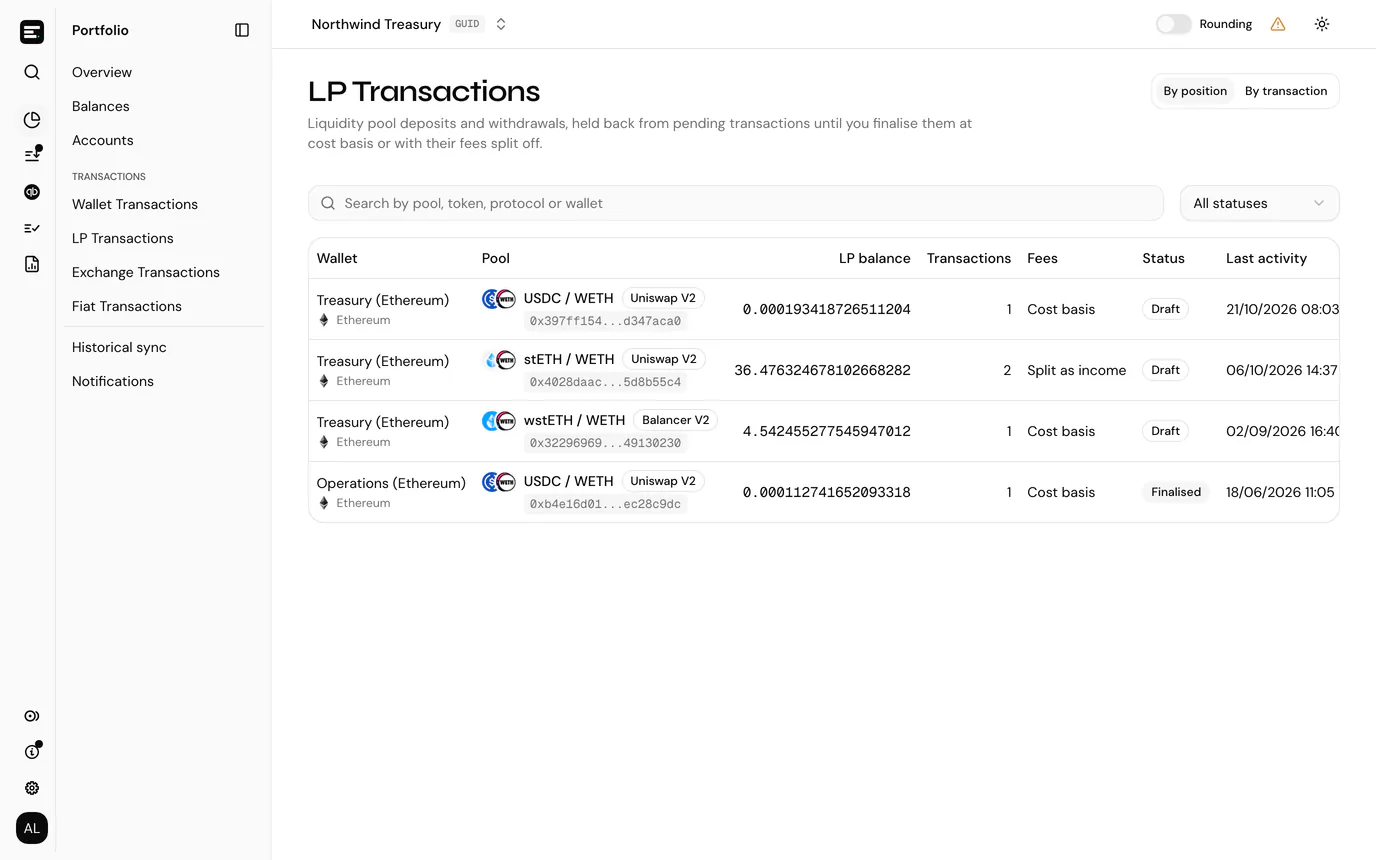
| Column | Shows |
|---|---|
| Wallet | The account and its chain. |
| Pool | The pool's tokens, the LP token's address, and the protocol. |
| LP balance | LP tokens held after the latest transaction. |
| Transactions | How many transactions the position has. |
| Fees | How its draft withdrawals will be finalised: Cost basis, Split as income, or Split on n of m withdrawals. |
| Status | Draft while any transaction is still a draft, Finalised once none is. |
| Last activity | The latest transaction's date and time. |
Filter by All statuses, Draft or Finalised, and search by pool, token, protocol or wallet. Select a position to open it.
By transaction has the date and transaction hash (linked to the block explorer), wallet, pool, type, LP minted / burned, LP balance, LP token price and status. Filter it by status and type, or search by token, pool, protocol, wallet or transaction hash.
A position
The position page is headed with the pool's tokens, and names the protocol, chain and account underneath. Above its transactions it shows the account, pool, LP balance and the number of Drafts.
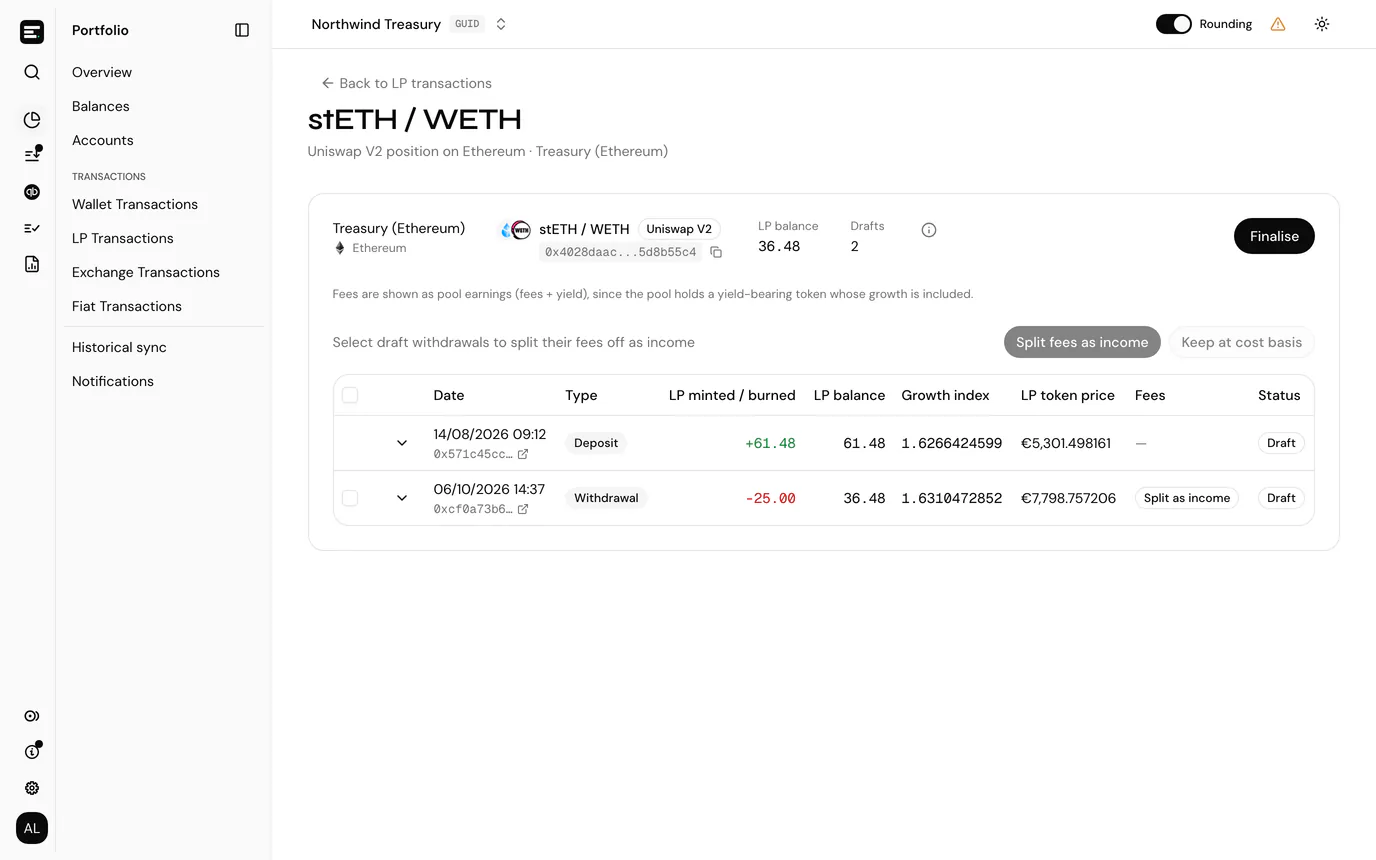
| Column | Shows |
|---|---|
| Date | When the transaction happened, with its hash linked to the block explorer. |
| Type | Deposit, Withdrawal, Fee claim or Unknown. |
| LP minted / burned | LP tokens received (positive) or returned (negative). |
| LP balance | LP tokens held after the transaction. |
| Growth index | The pool's value per LP token at the end of the transaction's block. See fees. |
| LP token price | The LP token's end-of-day price on the transaction's day, in your entity currency. |
| Fees | For a withdrawal, Cost basis or Split as income. |
| Status | Draft or Finalised. |
Select a transaction to expand the rows it adds to pending transactions: the type, token, amount, the token's end-of-day price and value, and whether the row is principal or fee. A line above them says how many rows finalising adds, and how many are LP fee income.
LP token prices
The LP token price comes from the token list. If the LP token is not in it, Request price in the LP token price column asks for it to be added. The column then reads Price requested, and prices show once it is approved. See token prices.
Cost basis or fees as income
You choose, per withdrawal, how what you received is booked.
- Cost basis (the default). The rows go to pending transactions as they were synced. The fees the pool earned stay inside what you received on withdrawal.
- Split fees as income. Each token received on the withdrawal is split into two rows: the principal (what you received less the fee), and an
LP_FEE_INCOMErow for the fee.
Fee claims the indexer tagged on Uniswap V3 and V4 always become LP_FEE_INCOME rows, whichever you choose.
Splitting fees off as income
Fees can only be split on positions whose growth index can be read: Uniswap V2, Curve, Balancer V2 and Balancer V3. Other positions say they are finalised at cost basis.
- Select Fetch growth indexes at the top of the position. It reads the growth index of every draft deposit and withdrawal that has none, and looks up any missing LP token prices. A transaction whose read failed shows the error and a Retry button; one not yet read has Fetch.
- Tick the draft withdrawals whose fees you want to split off. The checkbox in the header selects them all.
- Select Split fees as income. Keep at cost basis puts selected withdrawals back.
Fees are calculated once every deposit and withdrawal has a growth index, and again whenever growth indexes are fetched. A withdrawal with no deposit before it in the position cannot be calculated.
The info icon next to Drafts opens How growth indexes and fees are calculated, with the source of the growth index for the position's protocol and a worked example. In short:
| Step | Calculation |
|---|---|
| Average deposit index | Each deposit's growth index, weighted by the LP tokens it minted. A withdrawal leaves it unchanged. |
| Fee share of a withdrawal | 1 − average deposit index ÷ withdrawal index, never below 0. |
| Fee | Amount received × fee share, for every token the withdrawal paid out. |
| Principal | Amount received − fee. |
On a pool holding a yield-bearing token, fees are shown as pool earnings (fees + yield), since that token's growth is included. On Curve cryptoswap pools, fees are net of rebalancing.
Finalise a position
Finalising writes the position's draft rows to pending transactions, where you post them like any other transaction. See post a transaction.
- Select Finalise at the top of the position.
- Check the preview. It lists every row that will be added, with its date, type, token and amount, and says how many are LP fee income.
- Select Finalise.
Finalising is blocked, with the reason in the dialog, when every transaction is already finalised, or when a withdrawal set to split fees has no calculated fee yet. Fetch the missing growth indexes, or keep those withdrawals at cost basis.
Finalised transactions are locked: they can no longer be changed on this page. If a posting made from one is reverted, the row returns to pending transactions.
LP_FEE_INCOME is a transaction type of its own, so an owner or admin can put it into a daily transaction group on Accounting → Setup → Groups. See grouped transactions.
Who can use it
Fetching growth indexes, choosing how withdrawals are booked, requesting prices and finalising need write access. Viewers see positions and transactions without those actions. See roles and permissions.