
IAS 38 remeasurements
Under IFRS, crypto tokens held for investment are usually intangible assets under IAS 38. They are not simply marked to market. Each token is carried at cost less impairment (the cost model) or at fair value with gains above cost going to other comprehensive income (the revaluation model). An entity that reports this way remeasures its crypto tokens with IAS 38 remeasurements instead of valuation adjustments.
A remeasurement works per token, not per token card. It takes the token's cost basis, the book value of every token card holding it at a reconciled date, and that day's price, and posts what brings the cards to the IAS 38 carrying amount.
Fiat token cards are not intangible assets. They keep using valuation adjustments, on the same screen. Stablecoins and spam tokens are not listed for remeasurement.
Set up
Everything except each token's model is on Settings → Entity → Valuation. Only owners and admins can change it.
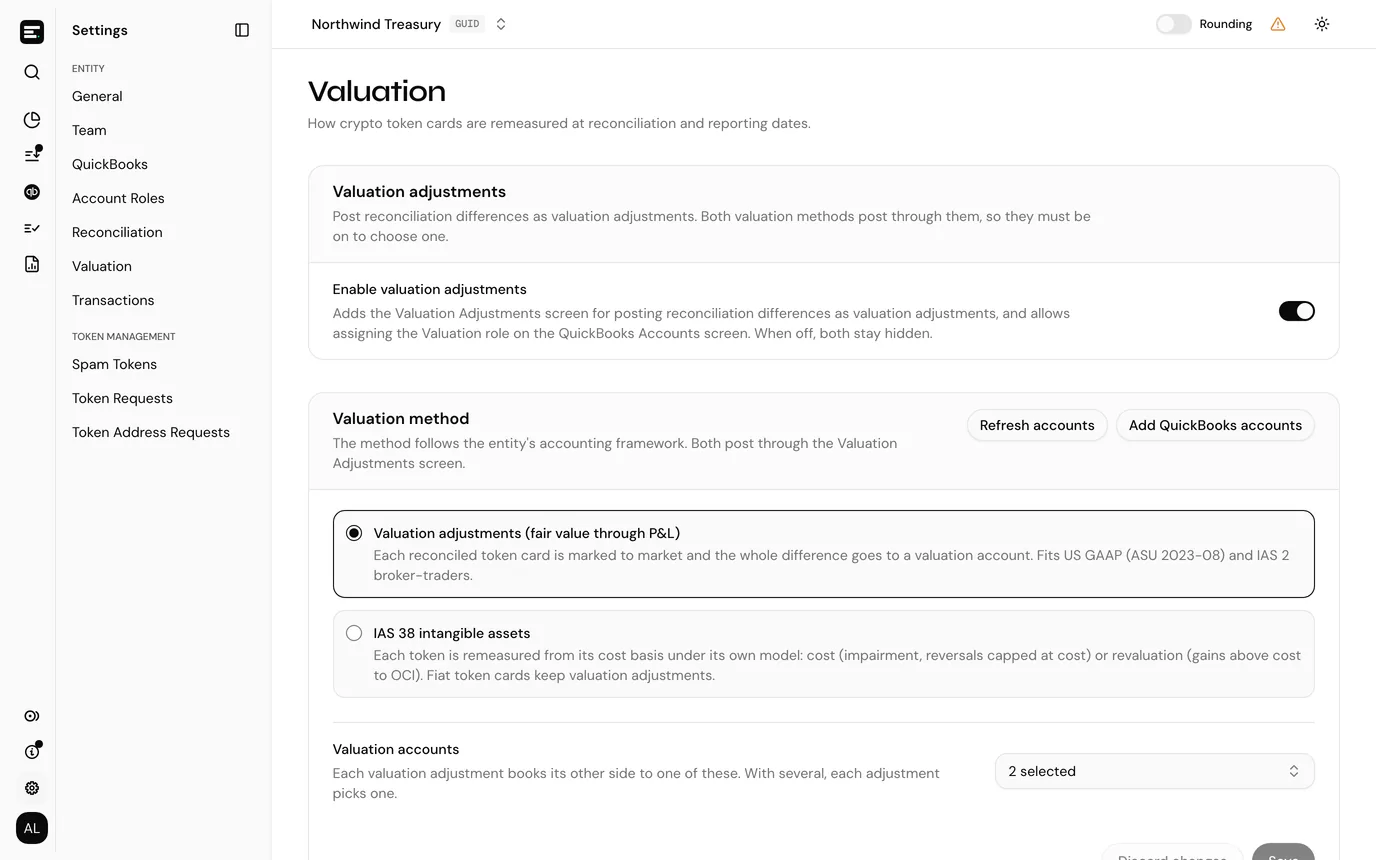
Switch on Enable valuation adjustments under Valuation adjustments. IAS 38 posts through valuation adjustments, so the Valuation method section only appears once it is on.
Choose IAS 38 intangible assets under Valuation method. It is refused while any token has a cost basis opening balance using LIFO, because IFRS does not permit LIFO: recreate those opening balances with another method first. Once remeasurements are posted, the entity cannot switch back to Valuation adjustments (fair value through P&L) until they are all reverted.
Set the IAS 38 options:
Setting What it does Cost model impairment test Whole holding (the default) tests the token's whole holding against its recoverable amount. Each lot tests every cost basis lot on its own. Move surplus to retained earnings on disposal Revaluation model only. On (the default), the surplus of tokens disposed of moves from the revaluation surplus account to retained earnings. Off, it stays in the revaluation surplus. Financial year end A month and day, 31 December by default. 29 February is not offered. Every token must be remeasured on this date each year it is held. Cost model impairment test and Move surplus to retained earnings on disposal cannot change while remeasurements are posted. Financial year end can.
Set the IAS 38 accounts. Each starts as Not assigned. Only the ones your postings need are required:
Account Receives Impairment account (P&L) Impairment losses and their reversals, and revaluation decreases below cost. Disposal result account (P&L) Gains and losses on tokens disposed of: proceeds less their carrying amount. It may be the same account as impairment. Revaluation surplus account (equity, OCI) Revaluation model only: increases above cost. Retained earnings account (equity) Revaluation model only: the surplus of tokens disposed of, without passing through P&L. The revaluation surplus account must differ from the other three, and retained earnings from the two P&L accounts. An account must be active in QuickBooks, and cannot be a token card account or a suspense account. If an account is missing, Add QuickBooks accounts opens the import page in a new tab, and Refresh accounts loads it into the pickers.
Choose Valuation accounts if you need them. Under IAS 38 they take a book value the cost basis does not explain (see Account for the unexplained book value), and your fiat token cards' valuation adjustments.
Select Save. You see "Valuation policy updated". Discard changes puts back what was saved.
Set the costs of disposal if any token uses the cost model. See Costs of disposal.
Give each token a cost basis opening balance. IAS 38 measures a token from its cost basis, so a token without one cannot be remeasured. While the entity uses IAS 38, LIFO is shown as not available in the method list.
Pick a model for each token in the Model column of the remeasurement list. See Pick each token's model.
Costs of disposal
The cost model tests each token for impairment against its recoverable amount: fair value less costs of disposal (IAS 36). A cost model token is blocked until a setting is in force for it on the reporting date. Set the entity default before the first cost model remeasurement. The Costs of disposal (IAS 36) section appears on Settings → Entity → Valuation once IAS 38 is saved as the method.
- Pick what it Applies to: Entity default, or one token. A token's own setting wins over the entity default.
- Pick Effective from. A setting applies from that day on, and must come after the latest cost model remeasurement it affects.
- Enter the Percentage of fair value, from 0 up to 100. 0.2 means 0.2%. Enter 0 if it is negligible.
- Enter the Fixed amount per disposal in your entity currency, for example gas. It is deducted once per lot, or once for the holding, depending on Cost model impairment test.
- Optionally note the Basis: how you estimated the rate.
- Select Save costs of disposal.
The table lists each setting with Applies to, Of fair value, Fixed per disposal, Effective from, Basis and Last changed. Deleting one makes the setting before it apply again from its date. A change never restates a posted remeasurement, and the audit trail keeps every change.
Pick each token's model
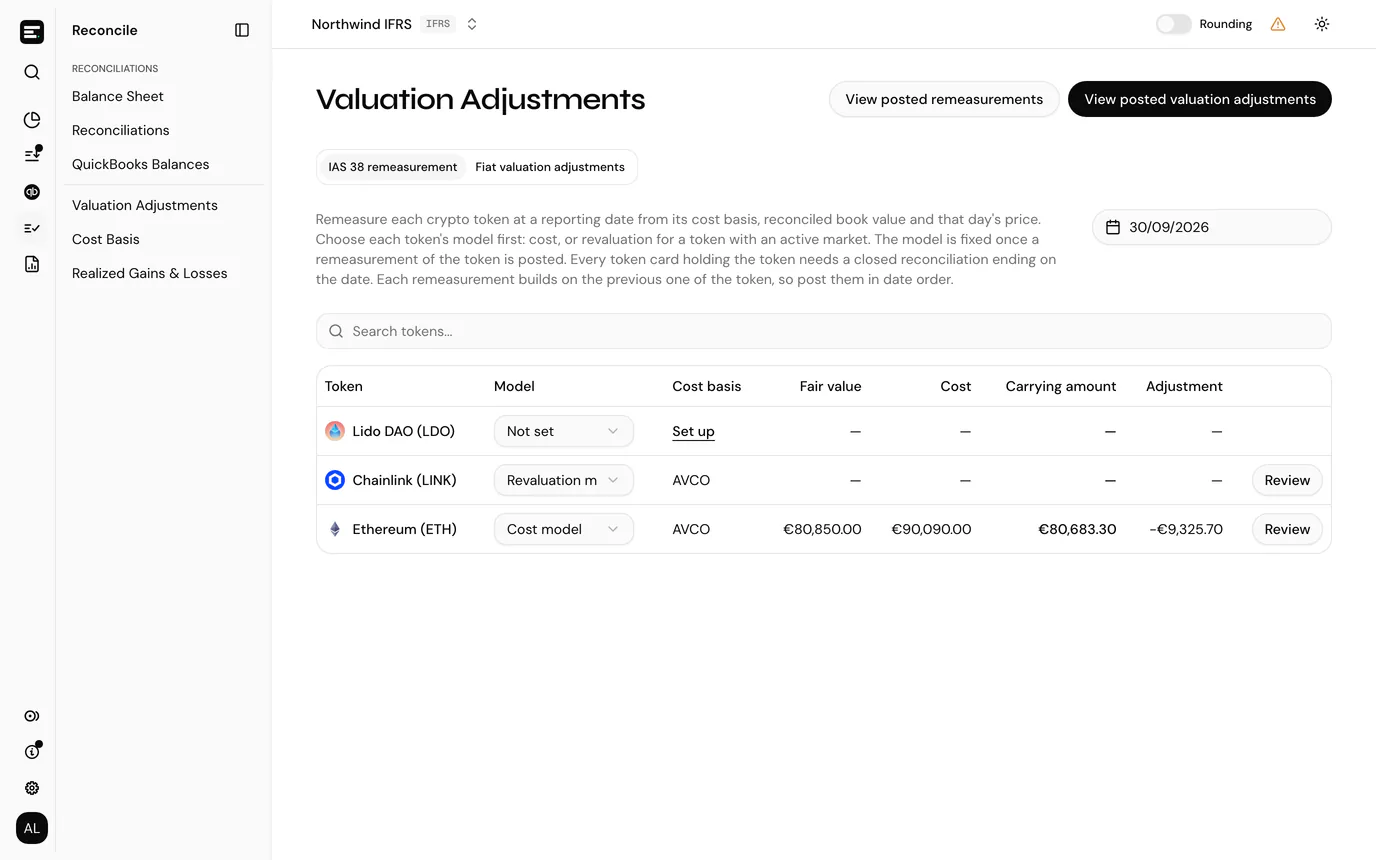
Select Reconcile → Valuation Adjustments and pick a reporting date (see below). Every held token is listed, and the Model column shows Not set until you choose Cost model or Revaluation model. The revaluation model needs an active market for the token.
Only owners and admins can set a model. A token's model is fixed while remeasurements of it are posted: hover it to see "Fixed while remeasurements of this token are posted".
Remeasure at a reporting date
Reconcile up to the date. Every token card holding the token needs a finalised reconciliation ending on the reporting date. A card with no postings up to that date is left out.
Open the list. Select Reconcile → Valuation Adjustments. If the entity also has fiat token cards, stay on the IAS 38 remeasurement tab.
Choose the date. Select Choose date (once a date is picked, the button shows it) and pick the reporting date, usually a month or year end. The latest day you can pick is yesterday (UTC). The date stays in the page address, so coming back from setting up a cost basis keeps it.
Read the list. Each held token shows:
Column What it shows Token The token. Model Its IAS 38 model, or Not set. Cost basis Its cost basis method. With write access, Set up opens a new cost basis opening balance for a token without one. Fair value Quantity held times the day's price. Cost The cost basis cost of what is held. Carrying amount What IAS 38 carries the token at. Adjustment The carrying amount less the reconciled book value. The figures stay empty while the token is blocked. A token with a model has Review, or View once it is remeasured on that date.
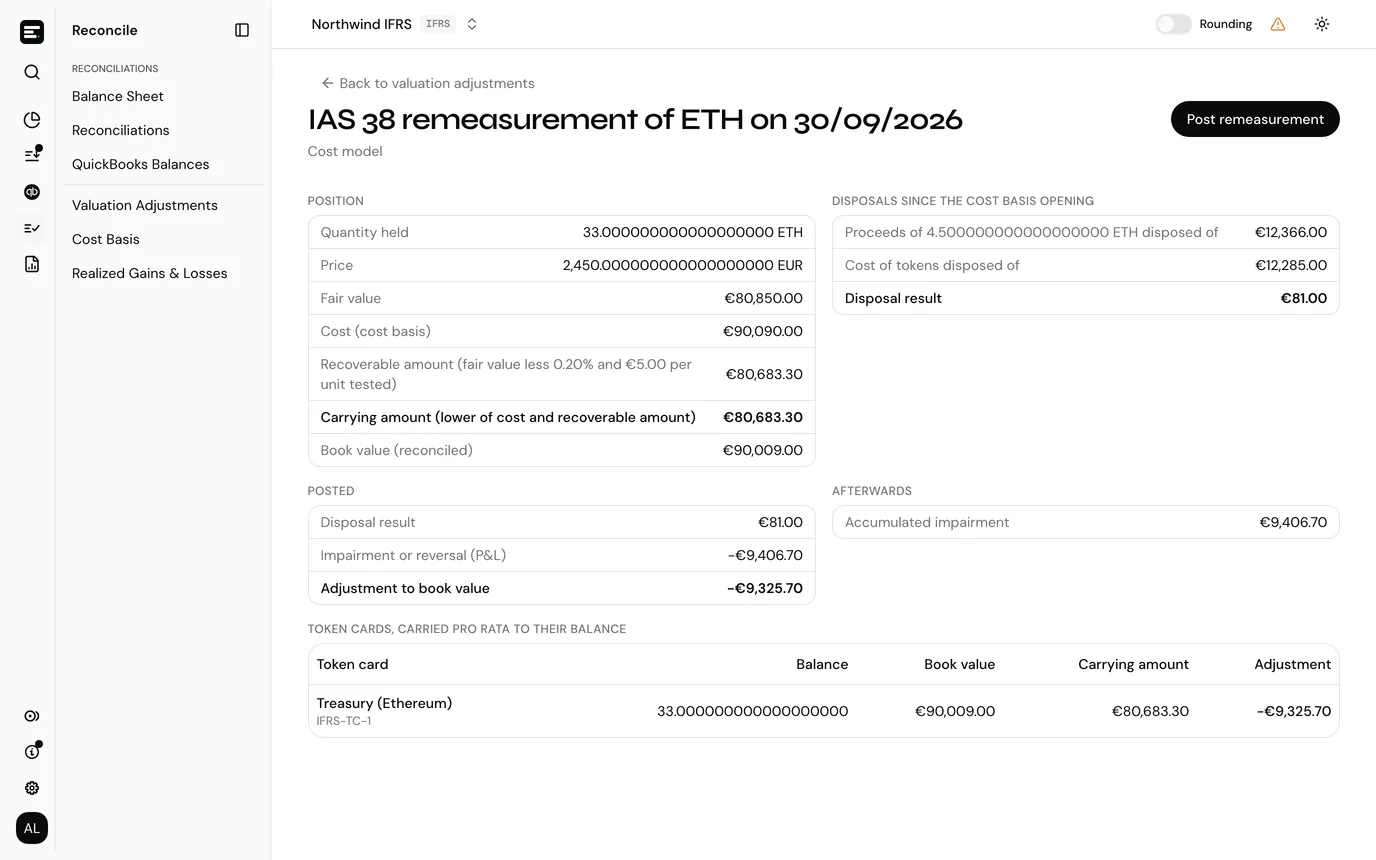
Select Review. The page is headed IAS 38 remeasurement of the token on the date. If the token is blocked, a notice says "This token cannot be remeasured on this date yet" and lists why. See When a token is blocked.
Check the breakdown and the token cards (below).
Select Post remeasurement. You see, for example, "ETH remeasured under IAS 38", and you go back to the list.
Post remeasurement needs write access. It stays disabled while the token is blocked, while an IAS 38 account the postings need is not set (a notice names it, with a link to valuation settings), while the unexplained book value has no account, or when there is nothing to post because the cards already carry the token at its carrying amount.
Remeasure each token in date order. Each remeasurement builds on the previous one of the same token, and a token cannot be remeasured on a date before its latest remeasurement.
The breakdown
| Section | What it shows |
|---|---|
| Position | Quantity held, Price, Fair value, Cost (cost basis), the Recoverable amount (cost model only), the Carrying amount and the Book value (reconciled). |
| Disposals since the previous remeasurement, or the cost basis opening | The proceeds of tokens disposed of, any Selling fees paid in another token or fiat, the Cost of tokens disposed of, their share of earlier impairment or revaluation, and the Disposal result. |
| Posted | How the Adjustment to book value splits into disposal result, P&L and OCI, plus any reclassified selling fees, swap differences and, when there is one, the part Not explained by the cost basis. |
| Afterwards | Accumulated impairment (cost model), or Revaluation surplus and Below cost (in P&L) (revaluation model). |
Below it, Token cards, carried pro rata to their balance lists each card with its Balance, Book value, Carrying amount and Adjustment.
How the carrying amount is worked out
- Cost model. The carrying amount is the lower of cost and recoverable amount, tested per lot or for the whole holding. A reversal of an earlier impairment never takes a lot above its cost.
- Revaluation model. The carrying amount is fair value. The part above cost goes to the revaluation surplus (OCI) and the part below cost to impairment (P&L).
- Disposals. The disposal result is the proceeds, less selling fees, less the cost of the tokens disposed of, less their share of an earlier impairment or revaluation. That share comes from the lots the cost basis matched the disposal to, pro rata to the quantity taken from each lot.
Account for the unexplained book value
If the cards' book value differs from what the cost basis explains, for example because of valuation adjustments posted before switching to IAS 38, the difference is posted on its own line to a valuation account. Pick it under Account for the book value not explained by the cost basis. With one valuation account it is picked for you. With none, a No valuation account set up notice offers Choose accounts.
What gets posted
Every posting carries the VALUATION_ADJUSTMENT category and moves value only, never quantity.
- On each token card, one valuation adjustment per part, dated at the end of its reconciliation and booked to the matching IAS 38 account: the disposal result, the remeasurement (P&L), the revaluation (OCI, revaluation model only) and any unexplained book value (to the valuation account you picked). Each part is shared across the cards pro rata to their balances. A card's rounding and per-card book value differences ride on its disposal line.
- Between accounts, dated at the end of the reporting date: the surplus moved to retained earnings, selling fees moved from the account that expensed them to the disposal result account, and swaps posted above what they received moved from the account they were posted against.
Lines below a cent are left out.
When a token is blocked
| Blocker | What to do |
|---|---|
| Costs of disposal not confirmed for the date (cost model) | Set them. Set costs of disposal on the notice opens the settings in place. Enter 0 if they are negligible. |
| Token cards with no finalised reconciliation ending on the date | Reconcile those cards up to the date. |
| No token card holds the token on the date | Nothing to remeasure. |
| No price on the date | Add a price for that day. |
| No cost basis opening balance, or it opens after the date | Add or move the opening balance. |
| Held on a financial year end that was skipped | Remeasure on that year end first. |
| Disposals with no identified lots | Identify them on the cost basis page. |
| Disposals exceed the cost basis pool | Acquisitions are missing from the cost basis. Categorise them. |
| The cost basis holds a different quantity than the reconciled cards | Postings are missing from the cost basis. Categorise them. |
| The previous remeasurement's cost basis lots no longer match | A posting dated on or before it changed. Revert that remeasurement and remeasure again. |
| Already remeasured on a later date | Revert that remeasurement first. |
| The previous remeasurement was partly reverted | Revert the rest of it first. |
The financial year end check starts after a token's first remeasurement: the first can be on any date.
Posted remeasurements
View posted remeasurements, in the page header, lists every IAS 38 remeasurement, latest measurement date first.
| Column | What it shows |
|---|---|
| Date | The reporting date. |
| Token | The token. |
| Model | The model it was measured under. |
| Carrying amount, Disposal result, P&L, OCI | The posted figures. |
| Status | See below. |
| Status | Meaning |
|---|---|
| Posted | Every line is posted. |
| Partly reverted | Some lines were reverted on their own, for example by reopening a token card's reconciliation. |
| Reverted | Every line is reverted. |
View opens the remeasurement with its breakdown and Posting lines: each Line, the Token card or account it posts from, the Account it posts to, the Value, and its Postings (or Reverted).
Revert
- Open the remeasurement with View, from the list or from Posted remeasurements.
- Select Revert.
- In Revert IAS 38 remeasurement?, select Revert.
Every posting of the remeasurement is reverted, and the reconciliations of its token cards are reopened, with any later ones on those cards. Only the latest remeasurement of each token can be reverted, and you need write access.
Reconciliation
The token card lines are valuation adjustments on the reconciliation ending on the reporting date. Reopening that reconciliation reverts the lines on that card, as it does any valuation adjustment. The rest of the remeasurement stays posted and shows as Partly reverted. The token cannot be remeasured again until you revert the rest, so revert it and post it again once the reconciliation is finalised.
Realized PnL
Under IAS 38 the gain or loss on tokens sold is the proceeds less their carrying amount, and the remeasurement posts it as the disposal result. Realized Gains & Losses shows proceeds less cost basis cost instead, so an IAS 38 entity can view it but not post from it. Realized PnL postings to or from an IAS 38 account are refused.