
Payables & receivables
Bills and invoices,
settled in crypto.
A stablecoin payment usually settles a supplier bill or a customer invoice that QuickBooks already holds. Post the transaction to your suspense account, pick the open document it pays, and SimplyLedger writes the payment against it in QuickBooks as part of posting. Missing the document? Raise it from SimplyLedger.
What posting does
Pick the invoice. The payment writes itself.
A customer pays in USDC. Staged against suspense, the transaction is offered the customer's open invoices, read live from QuickBooks. Posting writes the payment against the one you pick, for the value you posted.
+4,986.20 USDC
Value €4,600.00
Contra · Suspense (Bank)
- INV-1187Halden Labs€5,000.00Use
- INV-1192Corvo Analytics€6,000.00
- INV-1201Halden Labs€2,250.00
Skip stages it with nothing linked.
Payment against INV-1187
€4,600.00, deposited to suspense
Invoice balance
€400.00 left outstanding
Suspense match
Recorded for you, already cleared
Two moments
Settle it as you post, or match it afterwards.
Linking at posting time is the cheaper of the two, because the attribution happens while the transaction is in front of you. Suspense matching catches the rest.
Bills and invoices
Pick the open document while the transaction is in front of you. The payment is written in QuickBooks as you post, and the posting arrives already matched.
- Stage to suspense
- Pick the bill or invoice
- Post
Suspense matching
For everything that couldn't be attributed then. Match suspense postings to the QuickBooks payment, bill payment, transfer or journal entry that settled them, and post the difference.
- Refresh QuickBooks
- Select postings
- Match, then post the diff
Capabilities
From wallet transaction to a closed document.
Settled as you post
Stage a transaction against suspense and the open bills or invoices are offered. Pick one and the bill payment or payment is created in QuickBooks when you post.
Part payments handled
The payment is written for the value you posted, not the document's balance. Pay €3,000 against a €4,000 bill and €1,000 stays outstanding.
Raise what's missing
Create suppliers, customers, bills, invoices and service items from SimplyLedger. They're written straight into QuickBooks and ready to pick at once.
An audit trail both ways
Each bill or invoice lists its payments with the SimplyLedger posting they came from, linking back to the ledger posting and the wallet transaction.
Suspense matching for the rest
Anything not attributed at posting time can be matched later to a QuickBooks payment, bill payment, transfer or journal entry, and the difference posted.
Revert with a choice
Reverting a posting that settled a document asks whether to keep the QuickBooks payment, or delete it and reopen the balance.
Workflow
From an open invoice to a paid one.
- Step 01
Switch it on
Connect QuickBooks, enable suspense matching and bills and invoices, and assign a QuickBooks Bank account as suspense.
- Step 02
Stage the payment
Stage the transaction with your suspense account as its contra, and the open documents are offered.
- Step 03
Pick the document
Use links the bill or invoice. Skip leaves the value in suspense to match later.
- Step 04
Post
The payment is created in QuickBooks against the document, and the suspense match is recorded for you.
In the product
See it in SimplyLedger.
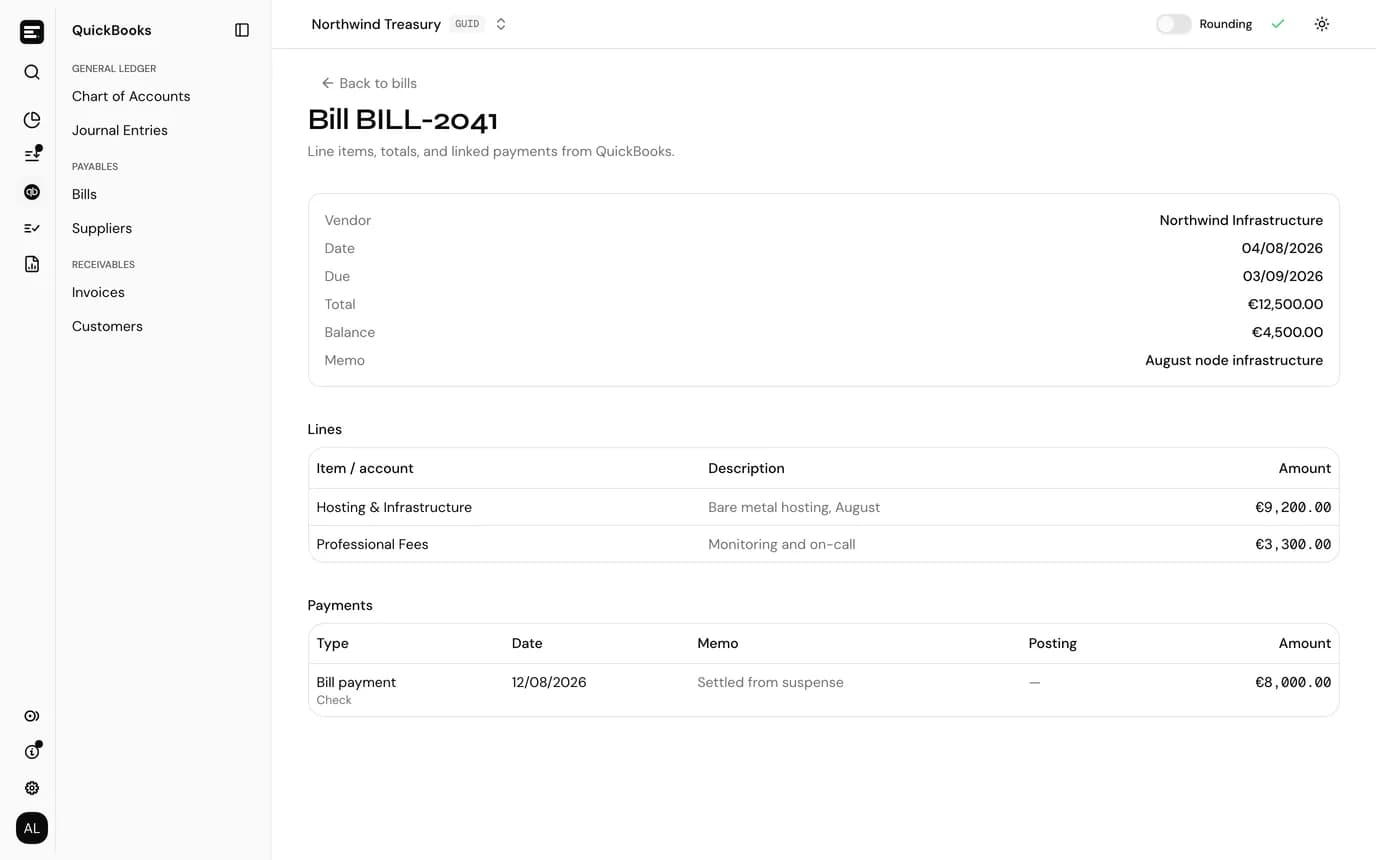
Each document, with what paid it
Lines, totals, the outstanding balance and every payment QuickBooks holds against the bill, with the SimplyLedger posting it came from.
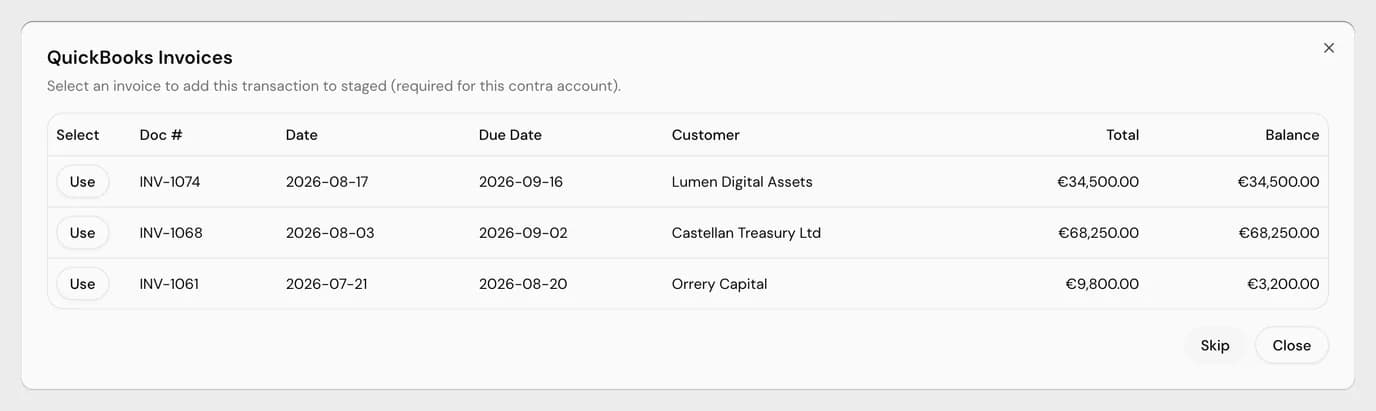
The picker at posting time
Only open documents, with number, dates, party, total and balance. Use links one; Skip stages without.
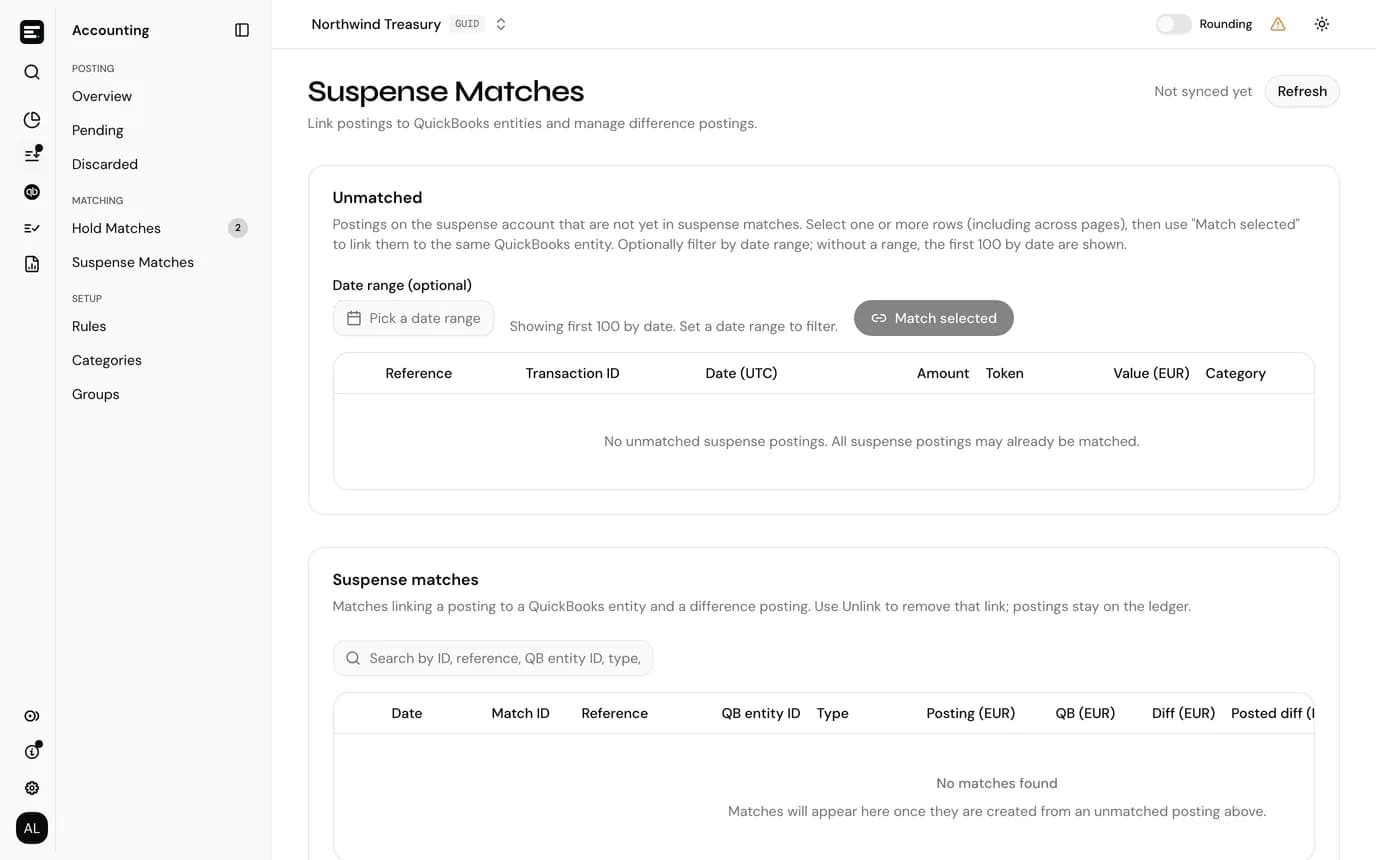
Suspense matches
Suspense postings matched to the QuickBooks entry that settled them, with the difference ready to post.
FAQ
Common
questions.
Quick answers about how SimplyLedger fits your stack. Need something more specific?
Talk to usWhy does the suspense account have to be a Bank account?
QuickBooks only accepts a Bank account as the account a bill payment is paid from and an invoice payment is deposited to.
What if we skip the picker?
The transaction stages with nothing settled. You can still select a bill or invoice on the staged row before posting, and after posting it can be matched on Suspense Matches.
Are the lists up to date?
Bills, invoices, suppliers and customers are cached and refresh every 30 minutes or on Sync. The picker at posting time and each document's page read QuickBooks directly.
Why is there a difference on a suspense match?
SimplyLedger and QuickBooks convert at different points, so the values rarely agree to the cent. Post the difference in one click; it books to your Suspense Matches account.
Keep exploring
More of what SimplyLedger handles.
- Cost basisCost basis & realized gainsAVCO, FIFO, LIFO, HIFO or Spec ID per token. Opening lots, the cost of every disposal, and realized gains posted by period.Explore
- IFRS valuationIAS 38 remeasurementsCost or revaluation model per token. Impairment tested against recoverable amount, OCI surplus and disposal results posted to QuickBooks.Explore
- ReconciliationPeriod-end closePer token reconciliation against the balance actually held, recorded differences, valuation adjustments and a QuickBooks tie-out.Explore
- MatchingSwaps & bridgesBoth legs of a swap or bridge posted to a hold account and matched, with the residual posted to a difference account.Explore
- DeFi liquidityLP transactionsLiquidity pool deposits and withdrawals grouped by position, with trading fees split from principal using the pool's growth index.Explore
- StakingStaking balancesAvailable, delegated and unclaimed reward balances tracked as separate token cards, each read from the chain and reconciled on its own.Explore
- MonitoringBalance alertsAn email, Slack or Telegram message when a token card's balance goes below or above a threshold. In portfolio and accounting.Explore
Your crypto. Your books. In sync.
Book a call and we’ll walk you through the workflow for your stack.