
Reconciliation
Period-end close,
card by card.
Reconciliation compares what your postings say each token card holds with what it actually held on the closing date. Open periods in bulk, find the posting behind any mismatch, record genuine differences and finalise once they agree. Then true up value and check every QuickBooks account ties.
What it checks
What the ledger says, against what was actually held.
Starting balance plus every posting in the period gives the calculated balance. The actual balance is the one collected for the closing date. When they agree, the period can close.
- 01Pending or discarded transactions in the period
- 02Transactions not synced yet
- 03A posting on the wrong category or token card
- 04One leg of a swap or bridge still in hold
- 05A genuine difference: record it
Tick postings to test any subset against the actual balance, and revert a wrong one without leaving the draft.
The tie-out
Every QuickBooks account, down to the token card.
Each QuickBooks account's last synced balance sits beside the book balances of the token cards booked to it. A difference points you at the card behind it.
- TC-1Treasury · ETHAvailable€305,412.60
- TC-6Treasury · ETHDelegated€100,190.40
- TC-7Treasury · ETHUnclaimed rewards€7,277.15
- Book balance
- €412,880.15
- QuickBooks balance
- €412,880.15
- Difference
- €0.00Tied
Capabilities
Everything a crypto month-end needs.
Per token card
Every token in every account, and every holding type, reconciles on its own. An account holding ETH and USDC closes twice.
In bulk
Pick a chain, an account or account tags, tick the cards and open them all on one closing date. Finalise every matching draft together.
Find the mismatch
Tick postings to test a subset against the actual balance, see what's still pending in the period, and revert a wrong posting without leaving the draft.
Differences on the record
Record a genuine difference as one posting, or daily, monthly or over custom ranges, against the contra account you choose.
Value trued up
Post the difference in value left on a closed reconciliation to a valuation account, or run IAS 38 remeasurements instead.
Tied to QuickBooks
See each QuickBooks account's balance beside the token cards booked to it, card by card, until it reads Tied.
Workflow
From open period to signed-off close.
- Step 01
Open the periods
Choose the token cards and a closing date. Each becomes a draft against the balance collected for that day.
- Step 02
Clear the mismatches
Post what's pending, fix wrong postings, match legs left in hold, and record what's genuinely different.
- Step 03
Finalise
Close every matching draft. Its closing balance opens the next period.
- Step 04
Adjust and tie out
Post valuation adjustments, check QuickBooks balances, and queue the reconciliations report as a PDF.
In the product
See it in SimplyLedger.
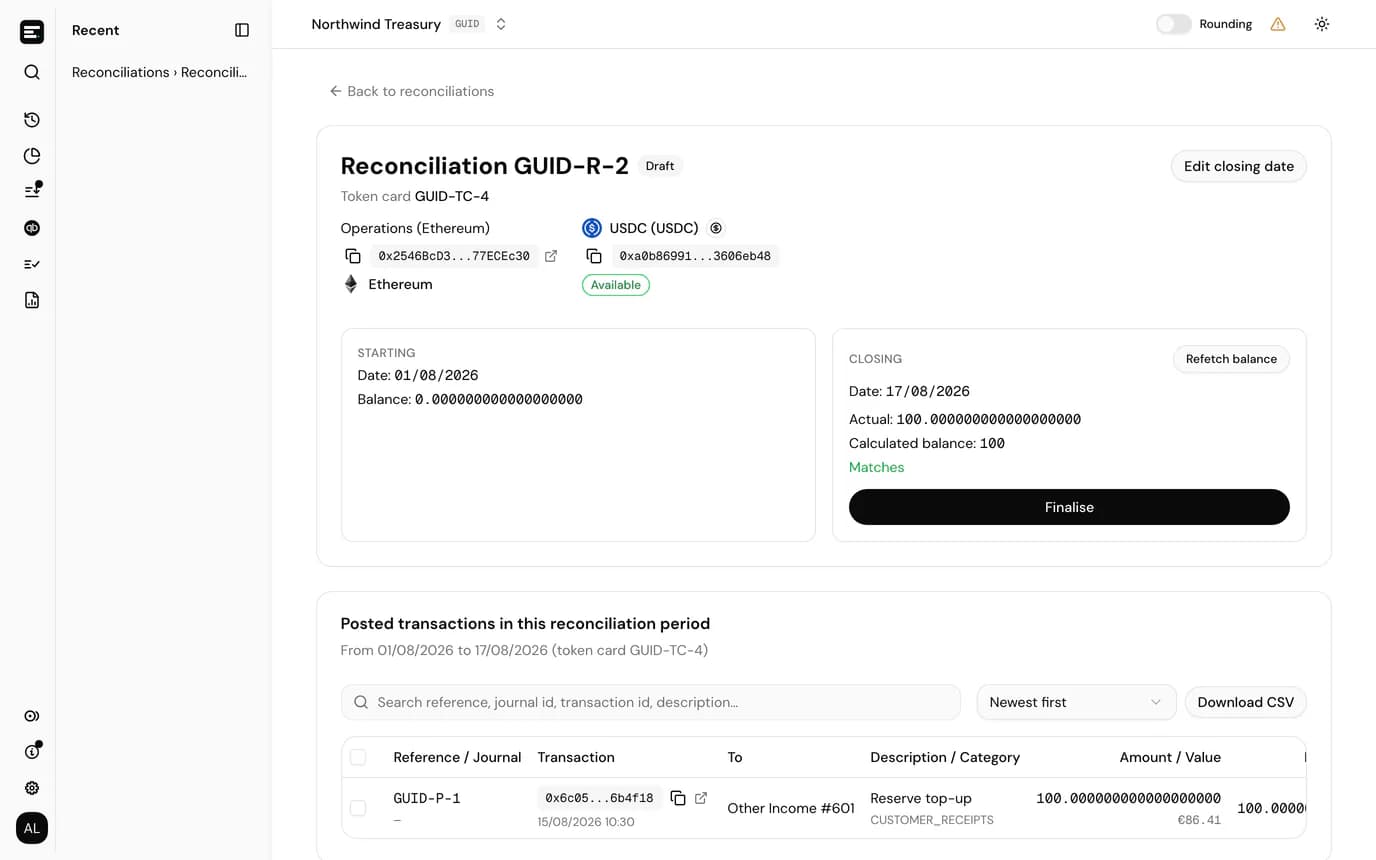
A draft that agrees
Starting, calculated and actual balances, with every posting in the period and a running balance to follow it line by line.
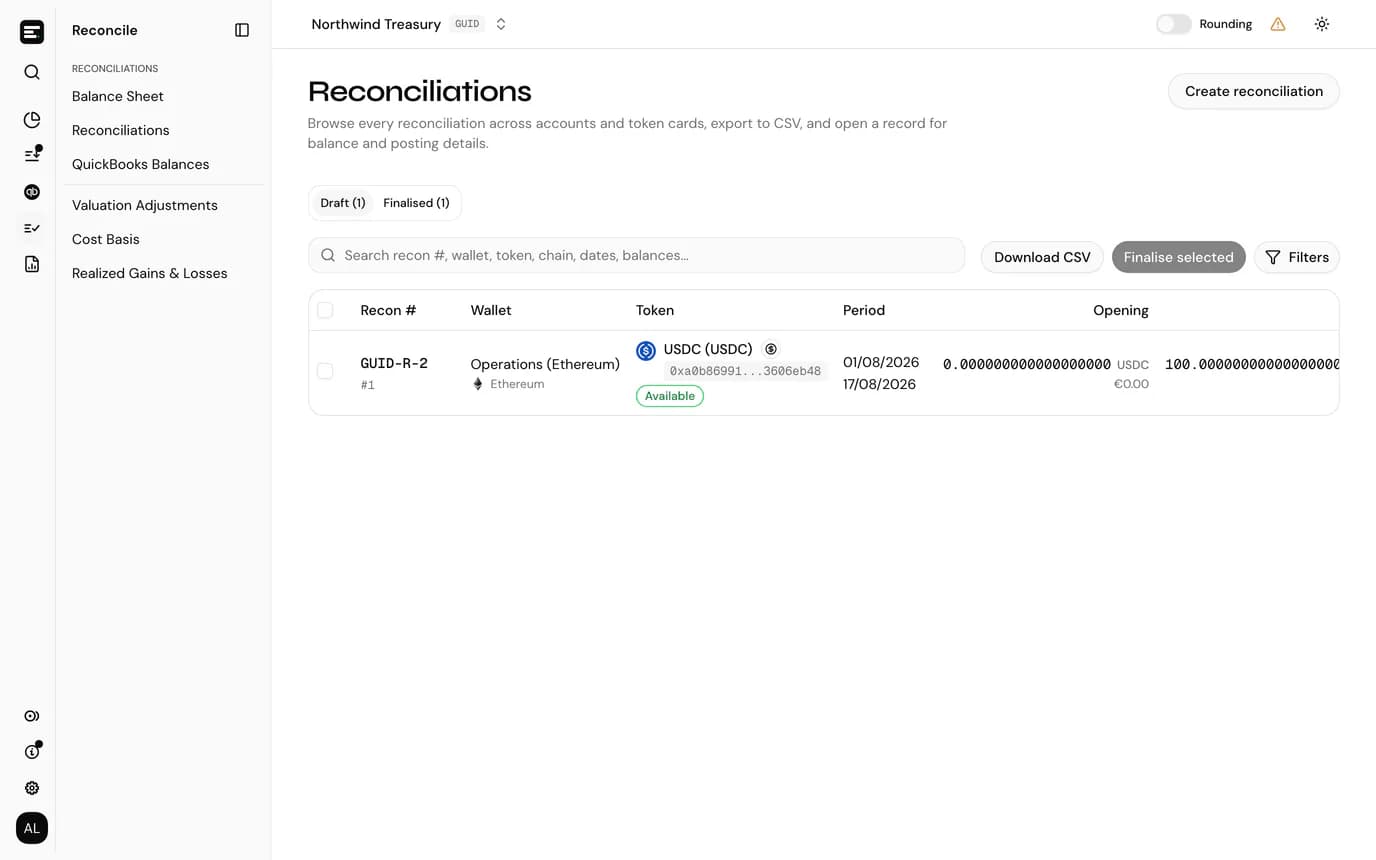
Every reconciliation in one list
Drafts and finalised periods across accounts, filterable by tags, chain, token, holding type and match status.
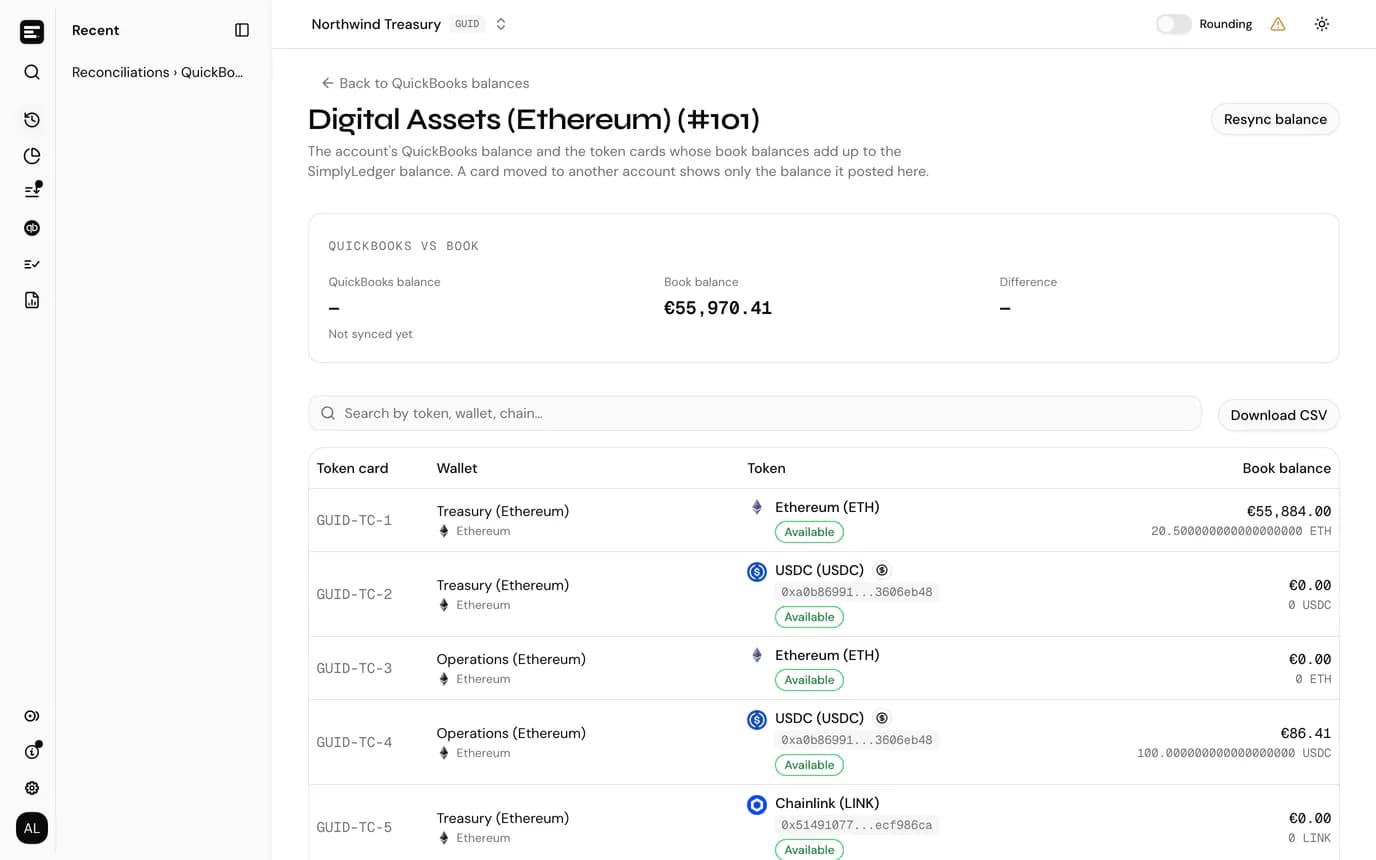
QuickBooks against the book
One QuickBooks account, its synced balance, and the token cards that make up the book balance.
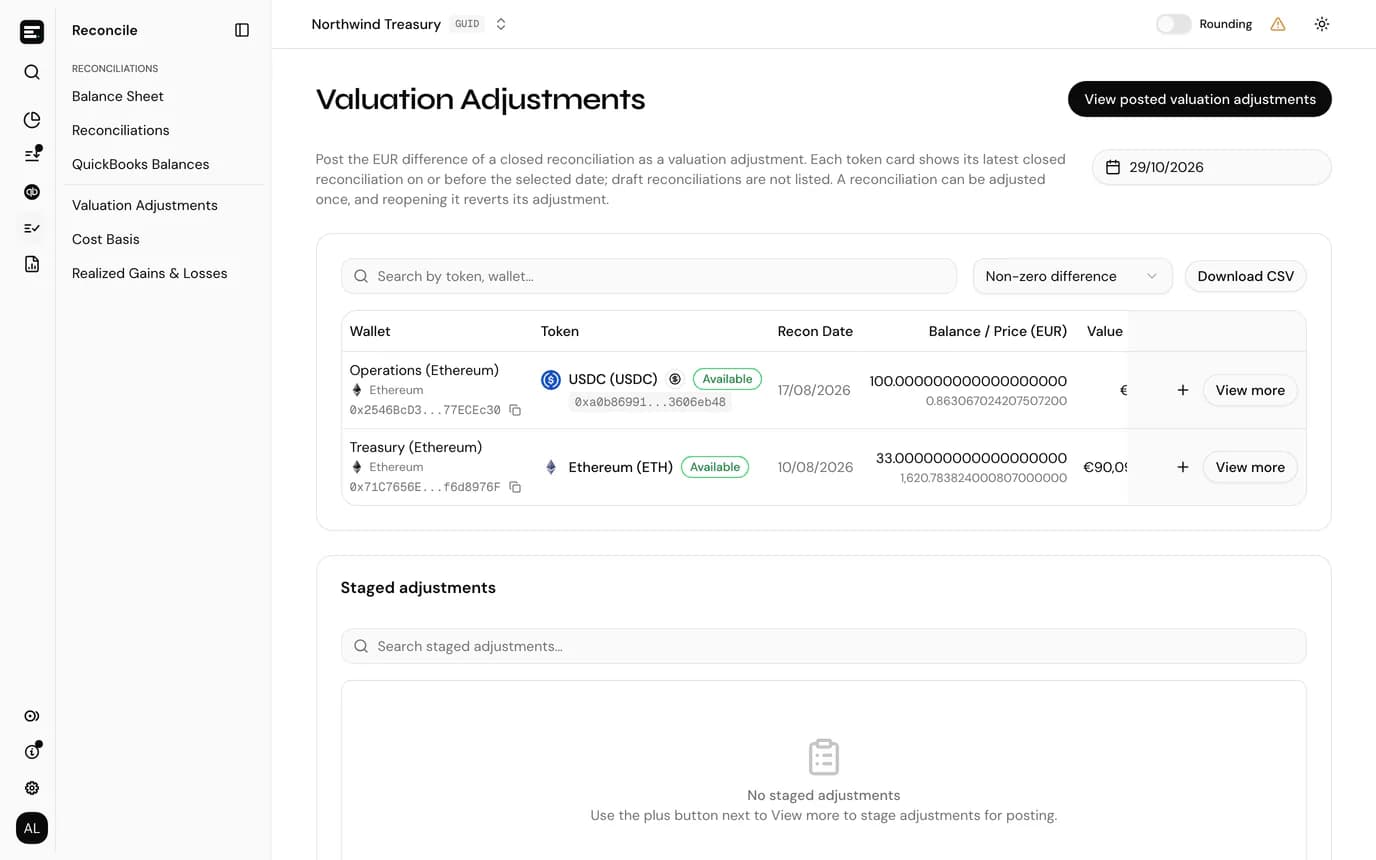
Valuation adjustments, staged and posted
The difference in value on each closed reconciliation, posted to the valuation account you pick.
FAQ
Common
questions.
Quick answers about how SimplyLedger fits your stack. Need something more specific?
Talk to usWhere does the actual balance come from?
From the daily closing balances SimplyLedger collects: read from the chain for on-chain cards, and from the provider's daily sync for BitGo, DFNS and Fireblocks wallets. Exchange and fiat cards, and anything a chain can't report for a past date, take a manual balance, badged as such.
What happens if a posting lands in a closed period?
That reconciliation reopens, along with every later one on the same card, and any valuation adjustment posted against it is reverted. The entity can be told by email.
Can we hand the close to an auditor?
Yes. The Reconciliations report is a PDF of every finalised reconciliation closing on a date: a summary table, then each reconciliation's transactions with their journal entries.
Do we need QuickBooks?
Reconciliation and recorded differences work without it. The QuickBooks balance tie-out needs QuickBooks Online connected, and valuation adjustments post to a QuickBooks valuation account.
Keep exploring
More of what SimplyLedger handles.
- Cost basisCost basis & realized gainsAVCO, FIFO, LIFO, HIFO or Spec ID per token. Opening lots, the cost of every disposal, and realized gains posted by period.Explore
- IFRS valuationIAS 38 remeasurementsCost or revaluation model per token. Impairment tested against recoverable amount, OCI surplus and disposal results posted to QuickBooks.Explore
- MatchingSwaps & bridgesBoth legs of a swap or bridge posted to a hold account and matched, with the residual posted to a difference account.Explore
- DeFi liquidityLP transactionsLiquidity pool deposits and withdrawals grouped by position, with trading fees split from principal using the pool's growth index.Explore
- StakingStaking balancesAvailable, delegated and unclaimed reward balances tracked as separate token cards, each read from the chain and reconciled on its own.Explore
- Payables & receivablesBills & invoicesPick the open QuickBooks bill or invoice a crypto payment settles, and the payment is written against it as you post.Explore
- MonitoringBalance alertsAn email, Slack or Telegram message when a token card's balance goes below or above a threshold. In portfolio and accounting.Explore
Your crypto. Your books. In sync.
Book a call and we’ll walk you through the workflow for your stack.