
Matching
Swaps and bridges,
matched leg to leg.
A swap or a bridge moves value in two on-chain transactions, often minutes or hours apart. Post both legs to a hold account and tick them together: SimplyLedger ties them into one match and posts the residual, the bridge fee or the price move between legs, to a difference account.
How a match works
Two legs in, one match out.
10,000 USDC bridged from Ethereum to Arbitrum arrives as two postings, one per chain. Matched across the linked hold accounts, they net to the bridge fee, which posts to the difference account by itself.
 14:02 · Ethereum
 −10,000.00 USDC
Contra Hold · Bridges (ETH)
 14:19 · Arbitrum
+9,996.40 USDC
Contra Hold · Bridges (ARB)
Match · linked hold accounts
One movement, two members
- In from the Ethereum leg
- 10,000.00
- Out to the Arbitrum leg
- −9,996.40
- Residual
- 3.60
Difference posting
3.60 · the bridge fee
Hold accounts
Back to zero for this movement
Hold or suspense
Two pairing tools for two different questions.
Hold is for legs you know belong together. Suspense is for money you know moved but couldn't attribute when you posted it.
These legs belong together.
- Pairs
- Postings with each other
- When
- A swap or bridge, once both legs have posted
- Residual goes to
- Difference account set on the hold account
Money moved, but what did it settle?
- Pairs
- Postings with a QuickBooks payment, bill payment, transfer or journal entry
- When
- Whenever the settling entry exists in QuickBooks
- Residual goes to
- The Suspense Matches account, when you post it
Capabilities
Two transactions, one movement.
Hold accounts from QuickBooks
Give any QuickBooks account the Hold role and it gets its own matching view, with a count of what's still unmatched.
Any number of legs
Tick two or more postings and match them. A bridge that fragments into several postings is one match with several members.
Across chains
Link hold accounts to each other so one match can span them, for bridges whose legs post to different accounts.
Residuals posted for you
Give the hold account a difference account and every match with a non-zero residual posts it there automatically.
Only the candidates
Limit a hold account's view to the categories that are actually swap and bridge traffic.
Cheap to undo
Unlinking keeps both postings on the ledger and reverts the difference posting, so a wrong pair takes a click to fix.
Workflow
From two loose legs to one closed match.
- Step 01
Set up a hold account
Tick Hold on a QuickBooks account in your chart of accounts, and choose its difference account.
- Step 02
Post both legs to it
Each leg posts as it lands, against the hold account, so neither side floats in your books.
- Step 03
Match
Search by hash, reference, token or category, tick the legs and select Match.
- Step 04
Check the difference
The residual shows in your entity currency. One far bigger than the fee you expected usually means the wrong pair.
In the product
See it in SimplyLedger.
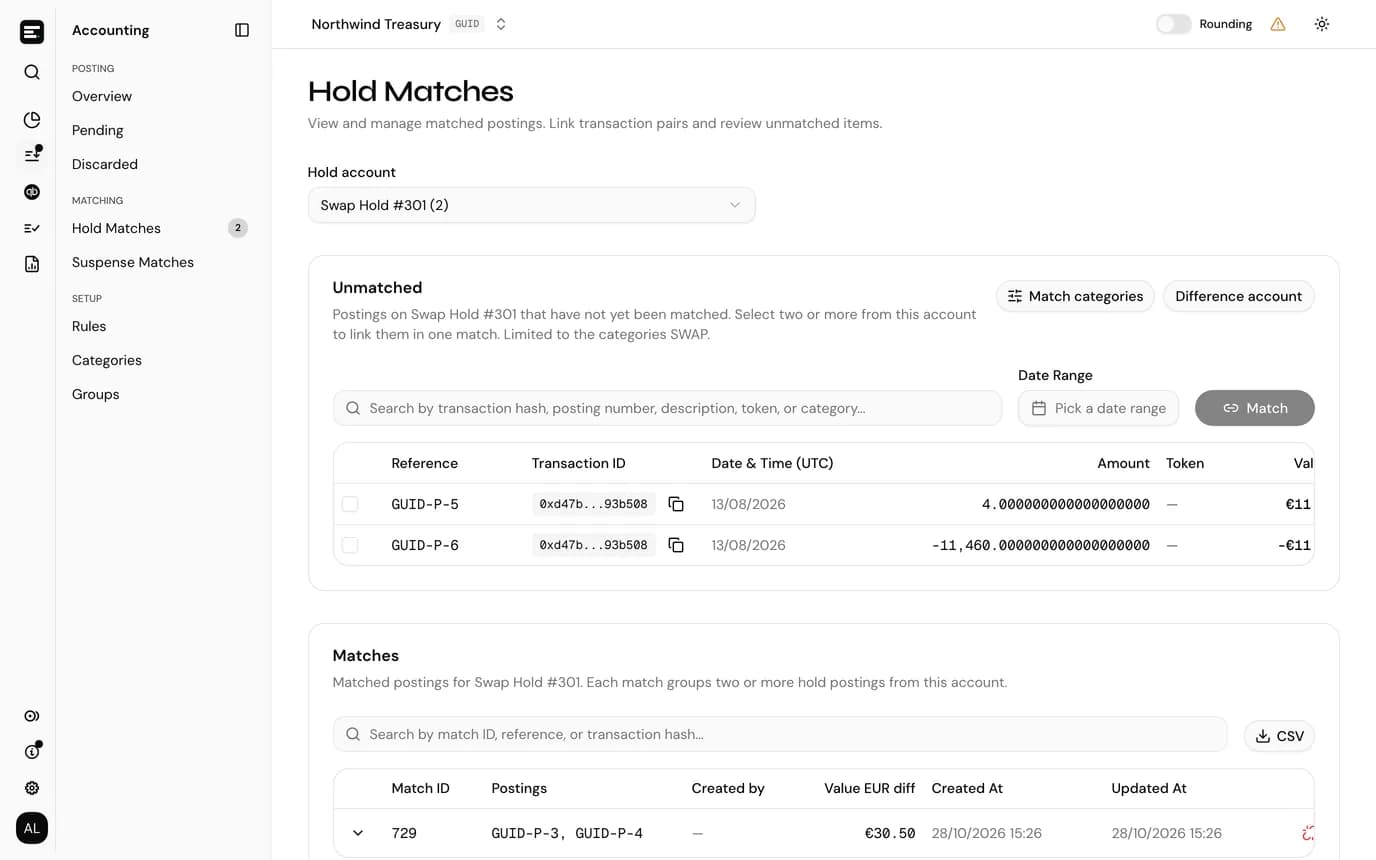
What's left to match on a hold account
Unmatched postings with their hash, date, amount, token, value and category, searchable and filtered by date.
FAQ
Common
questions.
Quick answers about how SimplyLedger fits your stack. Need something more specific?
Talk to usWhy not post a swap as one transaction?
On chain it isn't one. The legs are separate transactions, sometimes on different chains and hours apart. Posting each as it lands and matching them keeps every posting tied to a real transaction hash.
Why is there a difference at all?
Bridges charge fees, and the prices of the two tokens move between the legs, so the residual is rarely zero. It's also a useful check: a difference much larger than the expected fee usually means the wrong postings were matched.
How is hold different from suspense?
Hold pairs the legs of one movement you already know belong together. Suspense parks postings you couldn't attribute yet, to be matched to QuickBooks payments or journal entries later. They're separate account roles with separate screens.
What does it need?
QuickBooks Online connected for the entity, and at least one QuickBooks account with the Hold role.
Keep exploring
More of what SimplyLedger handles.
- Cost basisCost basis & realized gainsAVCO, FIFO, LIFO, HIFO or Spec ID per token. Opening lots, the cost of every disposal, and realized gains posted by period.Explore
- IFRS valuationIAS 38 remeasurementsCost or revaluation model per token. Impairment tested against recoverable amount, OCI surplus and disposal results posted to QuickBooks.Explore
- ReconciliationPeriod-end closePer token reconciliation against the balance actually held, recorded differences, valuation adjustments and a QuickBooks tie-out.Explore
- DeFi liquidityLP transactionsLiquidity pool deposits and withdrawals grouped by position, with trading fees split from principal using the pool's growth index.Explore
- StakingStaking balancesAvailable, delegated and unclaimed reward balances tracked as separate token cards, each read from the chain and reconciled on its own.Explore
- Payables & receivablesBills & invoicesPick the open QuickBooks bill or invoice a crypto payment settles, and the payment is written against it as you post.Explore
- MonitoringBalance alertsAn email, Slack or Telegram message when a token card's balance goes below or above a threshold. In portfolio and accounting.Explore
Your crypto. Your books. In sync.
Book a call and we’ll walk you through the workflow for your stack.