
Cost basis
Cost basis and realized gains,
token by token.
Pick AVCO, FIFO, LIFO, HIFO or Spec ID for each token. SimplyLedger builds its cost basis timeline from an opening position and your posted transactions, works out what every disposal cost, and posts each month's or year's realized gain or loss to QuickBooks Online.
Why the method matters
One sale. Four different gains.
Three ETH bought at three prices, then one sold. Each method draws that sale's cost from a different place, so the same transaction realizes a different gain or loss under each.
1 ETH sold for 2,500
| Method | Draws from | Cost of sold | Realized | |
|---|---|---|---|---|
AVCO Pool average | Avg 2,100 | 2,100 | +400 | |
FIFO Oldest lot | 12 Jan04 Mar19 Jun | 1,000 | +1,500 | |
LIFO Newest lot | 12 Jan04 Mar19 Jun | 2,300 | +200 | |
HIFO Dearest lot | 12 Jan04 Mar19 Jun | 3,000 | −500 | |
Spec ID Lot you pick | 12 Jan04 Mar19 Jun | Your choice | −500 to +1,500 |
Illustrative figures in your entity currency. Under Spec ID the period waits at Lots to identify until you pick, so nothing is posted half-costed.
How it's built
A timeline per token, from opening position to posted gain.
Every acquisition and disposal on the token lands on its timeline in date order, with a running balance, cost and average price, summarised by month or year.
Opening position
A balance and cost, or opening lots
Posted transactions
Categories counted in cost basis
Tokens spent on fees
Counted as disposals
Cost basis timeline
One token, one method
- Acquisitions add quantity and cost
- Each disposal costed by the method
- Running balance, cost and average price
- Summarised by month or year
Realized gains & losses
Posted once per period
Period summaries
Sold, proceeds, fees, cost of sold
IAS 38 remeasurements
Lots measured from their cost
Capabilities
What your tokens cost, and what selling them made.
Five methods, per token
AVCO pools every acquisition at a running average. FIFO, LIFO, HIFO and Spec ID match each disposal against distinct lots.
Spec ID when you need it
Choose which lots each disposal sold from. A period waits at Lots to identify until every disposal in it is chosen, so nothing posts half-costed.
Opening lots from a CSV
Bring in what you held before the opening date lot by lot, with the date, quantity and cost of each, for one token or every token at once.
Every token in one pass
Start from zero, enter one cost per token, or import lots. The opening balance is suggested from the token cards' closing balances, so you only add the cost.
Fees count as disposals
Tokens spent on fees count as sold, and their value sits in the disposal value next to the sale proceeds.
Posted once per period
Post a month's or year's realized PnL to the QuickBooks accounts you choose. A period can only be posted once, and the CSV export carries the posting's transaction ID.
Workflow
From opening position to posted gain.
- Step 01
Choose the method
AVCO, FIFO, LIFO, HIFO or Spec ID per token, with an opening date and monthly or yearly periods.
- Step 02
Set the opening position
A balance and total cost for AVCO, or opening lots for the lot methods. Every token at once, or one at a time.
- Step 03
Post as usual
Transactions in categories counted toward cost basis become acquisitions and disposals, with a running cost and average price.
- Step 04
Post realized PnL
Each period's disposal value less cost of sold, posted to QuickBooks in one click.
In the product
See it in SimplyLedger.
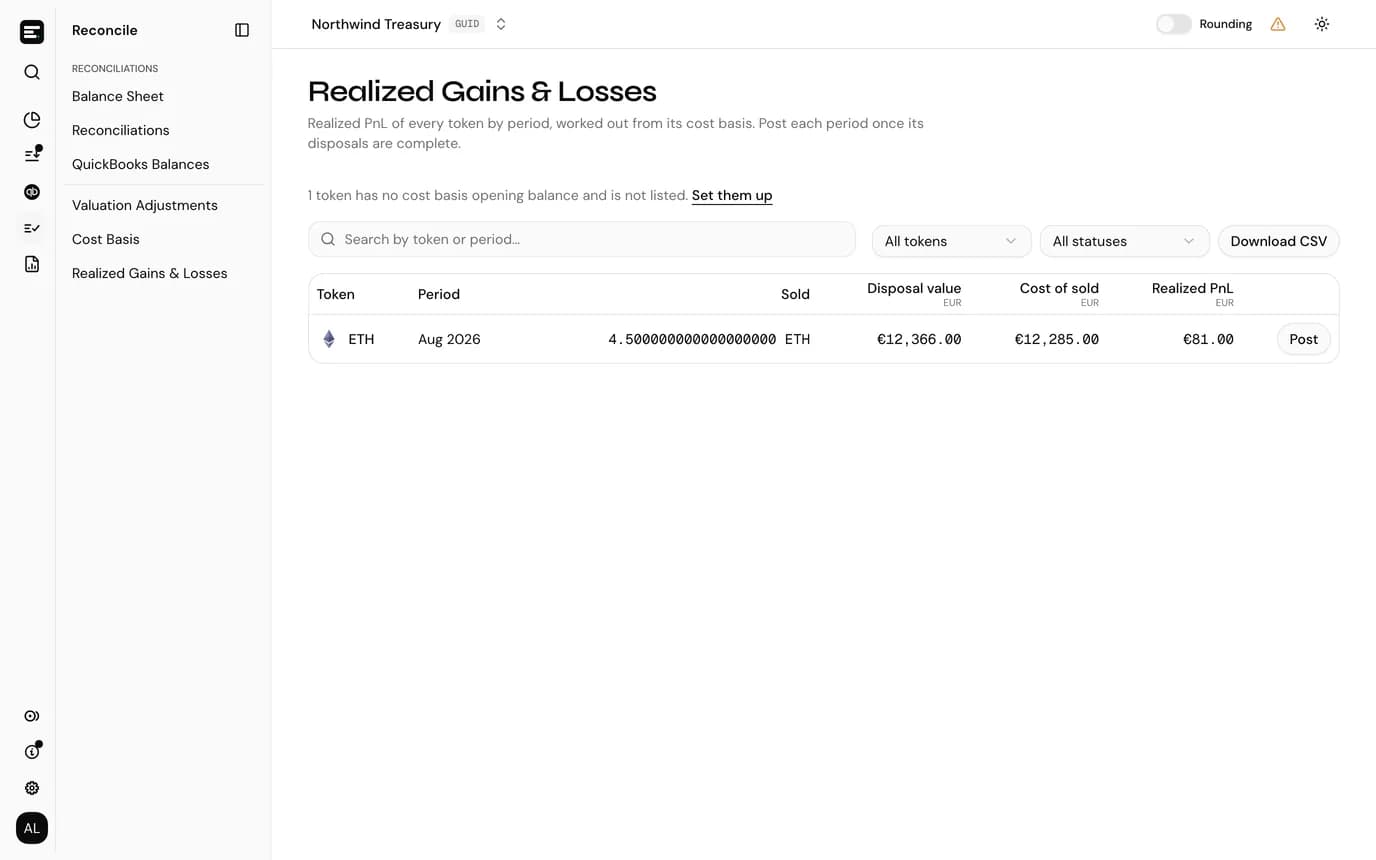
Realized gains, period by period
Sold, disposal value, cost of sold and realized PnL for every token and period, with the action each one is waiting on.
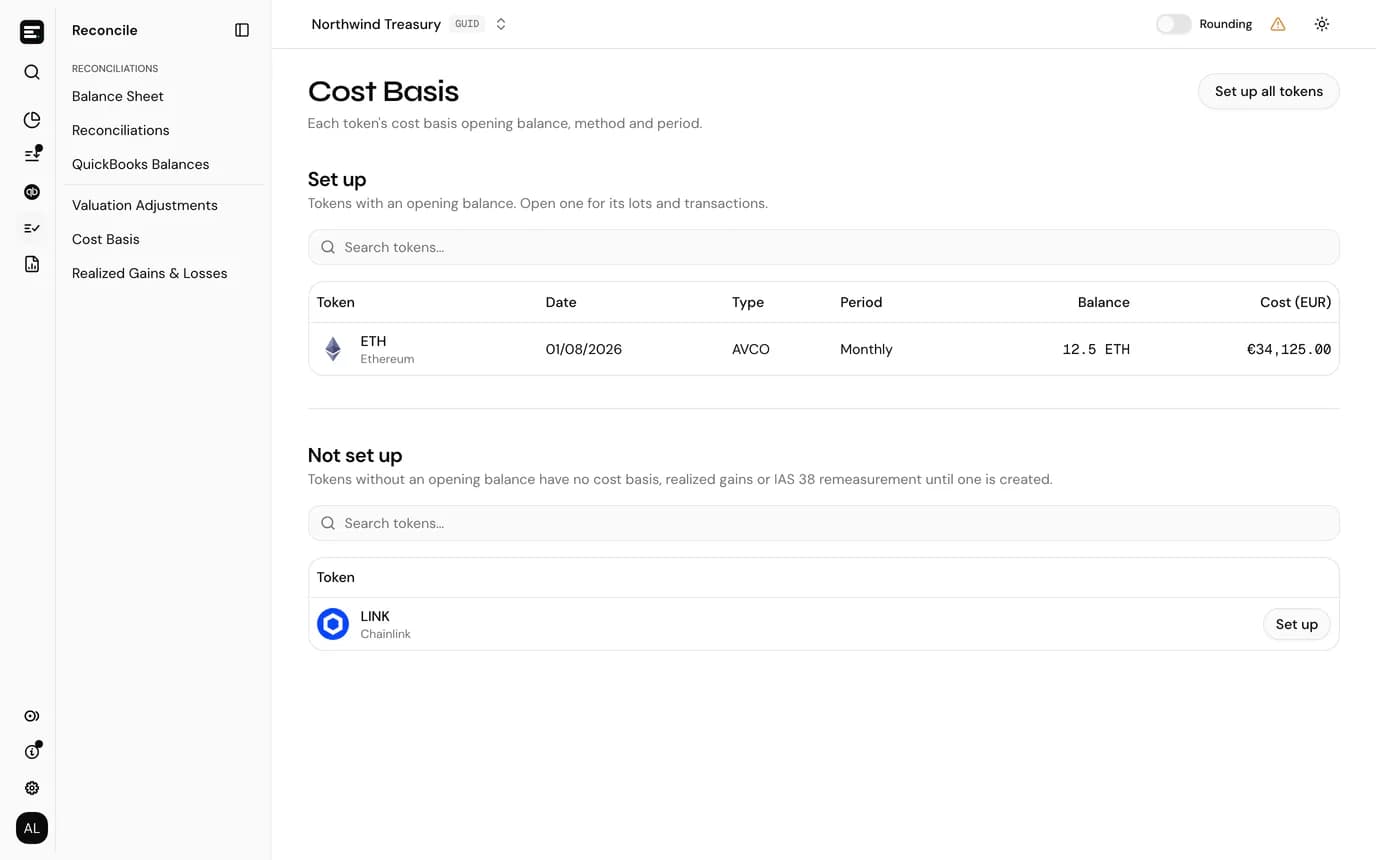
Every token's starting point
Opening date, method, period, balance and cost for each token set up, and the tokens still to do.
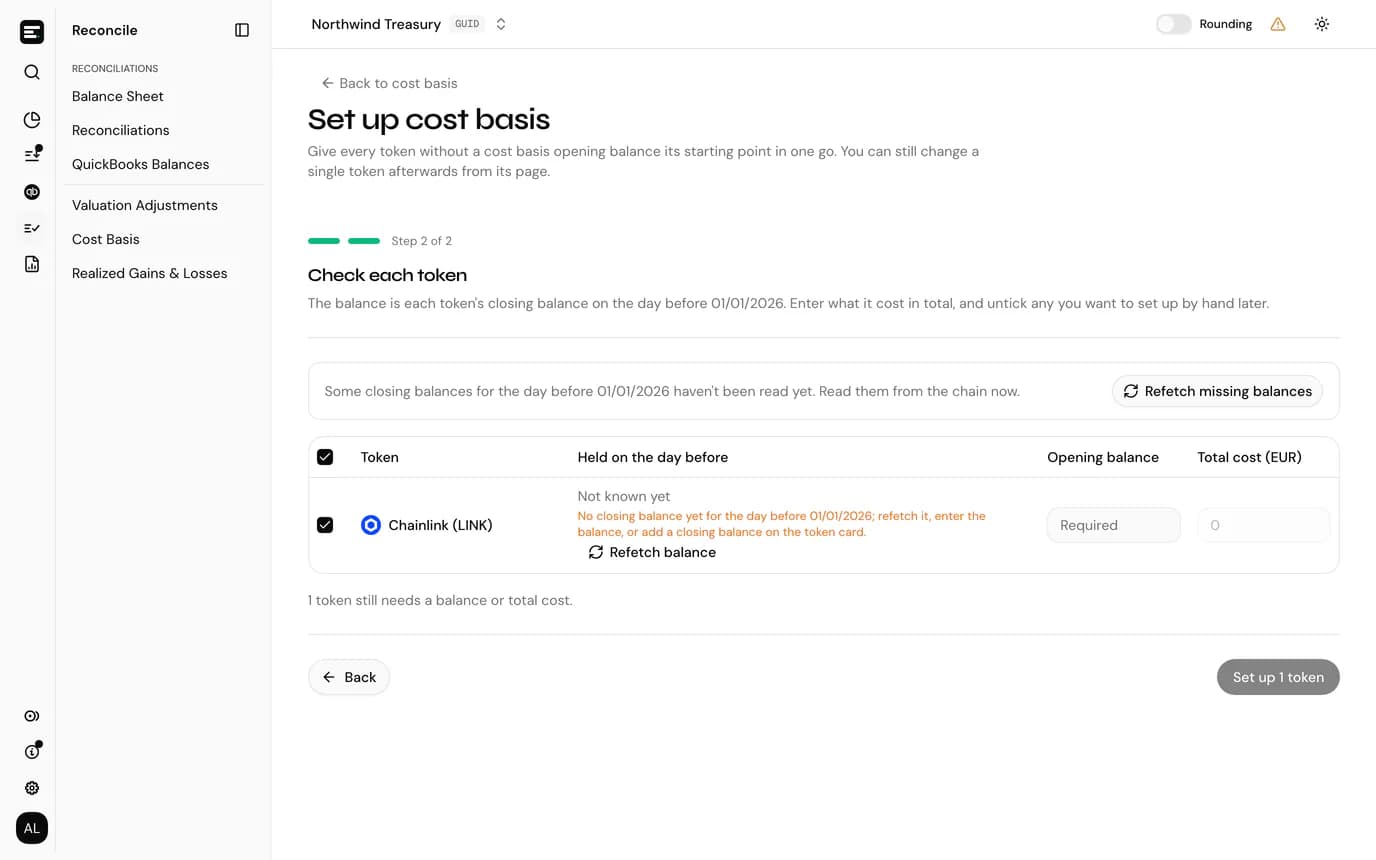
Set up every token at once
Start from zero, one cost per token, or opening lots from a CSV, applied to every token without an opening balance.
FAQ
Common
questions.
Quick answers about how SimplyLedger fits your stack. Need something more specific?
Talk to usWhich method should we use?
That's down to your jurisdiction and accounting policy, and the choice changes the gains you report. AVCO needs only a total balance and cost to start. The lot methods need acquisition records for anything held before the opening date; without them, selling those holdings reports the full proceeds as gain.
Can we change method later?
Yes, by deleting the token's opening balance and creating a new one. Everything downstream recomputes. Realized PnL already posted for a period isn't rewritten, so reconcile the two deliberately.
Which transactions count?
Those whose category has Use in cost basis switched on. A transaction in any other category is neither an acquisition nor a disposal.
How does it work with IAS 38?
IAS 38 remeasurements measure each token from its cost basis lots, and LIFO isn't available because IFRS doesn't permit it. The remeasurement posts the disposal result, so realized gains stay visible here for tax or management reporting but aren't posted twice.
Keep exploring
More of what SimplyLedger handles.
- IFRS valuationIAS 38 remeasurementsCost or revaluation model per token. Impairment tested against recoverable amount, OCI surplus and disposal results posted to QuickBooks.Explore
- ReconciliationPeriod-end closePer token reconciliation against the balance actually held, recorded differences, valuation adjustments and a QuickBooks tie-out.Explore
- MatchingSwaps & bridgesBoth legs of a swap or bridge posted to a hold account and matched, with the residual posted to a difference account.Explore
- DeFi liquidityLP transactionsLiquidity pool deposits and withdrawals grouped by position, with trading fees split from principal using the pool's growth index.Explore
- StakingStaking balancesAvailable, delegated and unclaimed reward balances tracked as separate token cards, each read from the chain and reconciled on its own.Explore
- Payables & receivablesBills & invoicesPick the open QuickBooks bill or invoice a crypto payment settles, and the payment is written against it as you post.Explore
- MonitoringBalance alertsAn email, Slack or Telegram message when a token card's balance goes below or above a threshold. In portfolio and accounting.Explore
Your crypto. Your books. In sync.
Book a call and we’ll walk you through the workflow for your stack.